Sunrise Farm 3D
Free · Right in your browser
Sunrise Farm 3D
- Ability to play in full screen:
- Yes
- Technology:
- HTML5 / WebGL
- Platforms:
- Browser (desktop, mobile, tablet)
- File size:
- 2.08 MB
Game information
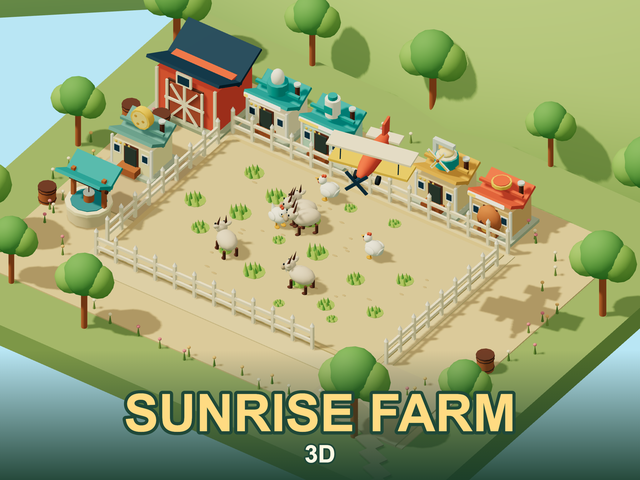
Sunrise Farm 3D is a farm management game about growing grass, caring for chickens and goats, and turning their produce into more valuable goods. Begin with eggs, establish a dough and cheese supply chain, and eventually make pizza. Animals, workshops, a delivery truck and a plane share one three-dimensional farmyard. Completing each order means managing cash, keeping storage clear and stopping bears before they reach your herd.
How to play Sunrise Farm 3D
- Select an available mission on the map. Check its required goods and animals, then start the farm.
- Water an open patch of ground. The grass feeds your animals; refill the empty well using farm coins.
- Collect eggs and goat milk into the warehouse. Products left on the ground eventually disappear.
- Start workshops, sell surplus goods at the market and order missing ingredients by plane.
- Complete every mission objective, collect your reward and continue. If the next order requires a blueprint, unlock it in the upgrades section.
Animals, grass and water
Chickens produce eggs, while goats provide milk. They wander around the yard and seek grass when hungry. Animals die without food, so do not wait until the last moment to water the ground. Watch the water supply and reserve enough money for the next refill. An upgraded well uses less water for each patch of grass.
Buy additional animals with the current mission’s coins. A larger herd produces ingredients faster but also needs more food. If the farm becomes empty and no recovery is possible, restart that mission. Previously completed orders and permanent upgrades remain available.
From eggs to pizza
Workshops need a manual start: building one does not make it work automatically. They take ingredients from storage, run for a short time and place the finished products in the yard. Collect these products too. A workshop’s level determines how many items it can process in one batch.
- An egg becomes egg powder.
- Egg powder and flour make dough.
- Goat milk becomes curds.
- Curds and cheese culture produce cheese.
- Pizza requires an egg, dough, curds, gherkins and butter.
Available buildings and deliveries vary between missions. Keep ingredients for the next workshop instead of selling everything. In this version, cheese and pizza follow different production chains: pizza uses curds.
Storage, the market and deliveries
Every stored product takes space. Milk, butter and captured bears occupy considerably more room than eggs. A full warehouse cannot accept another item. Clear it through sales, or increase its capacity when necessary.
The truck carries selected goods and animals to market. You receive the proceeds when it returns. The plane brings ingredients unavailable on your farm; its order window shows the current selection. Payment is taken at departure, and deliveries land in the yard for you to collect. Vehicles have a limited number of cargo boxes, so a large order may need several trips.
Bears and mission objectives
Bears threaten the animals. Click one repeatedly to build a cage, then click again to put the captured bear in storage. You can sell it at the market. Collect the cage promptly: it eventually breaks and the bear escapes.
There are 19 missions. Product objectives count everything you have collected during that mission. Processing or selling a counted item does not undo that progress. Animal objectives count the living animals currently on the farm. Avoid selling required chickens or goats just before completing an order.
Gold and silver medals reward quick completion. Missing their time targets does not end the mission: you can still finish the order. Mission rewards unlock permanent blueprints, while construction and upgrades inside a mission use its separate farm coins. Replay completed missions to improve your times and earn further rewards.
Tips
- Secure grass and water before expanding the herd.
- Check recipes before selling: a valuable product may be the next workshop’s ingredient.
- Clear some warehouse space before the plane returns so that you can collect its delivery immediately.
- Cage bears quickly, and remember the extra click needed to store them.
- Upgrade the part of your supply chain that is actually limiting production: storage, batch size or transport.
Saving and friends
Guest progress stays on this device, while registered players save personal progress to their account. Invite accepted friends to work together on one farm, with up to eight real participants in a room. The shared farm remains separate from a visitor’s personal campaign.
Similar games
- Farm Frenzy — the original Flash farm game about animals and production chains.
- Penguin Diner 3D — manage café orders, serve customers on time and improve the business.
- Dawn Kingdoms 3D — a larger strategy game with construction, resource gathering and settlement development.
How to play
Controls
- Left click / tap — choose an object or an interface action.
- Ground — water a patch to grow grass; well — refill it when empty.
- Product — collect into storage; bear — click repeatedly to cage it, then once more to collect it.
- Workshop — start a batch; the Buildings button opens construction and upgrades.
- Market / Ingredients — choose goods for the truck or a plane order.
- WASD / arrow keys — pan the camera; mouse wheel / + and − buttons — zoom.
- P — pause; use the continue button to return to the farm.