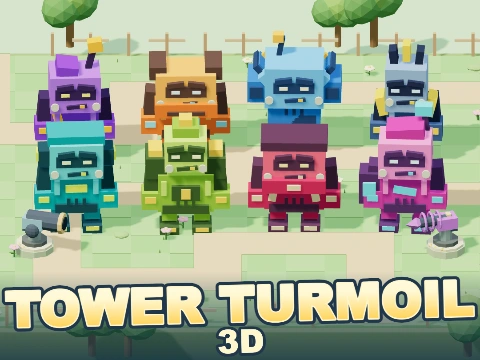
Tower Turmoil 3D
Free · Right in your browser
Tower Turmoil 3D
- Ability to play in full screen:
- Yes
- Technology:
- HTML5 / WebGL
- Platforms:
- Browser (desktop, mobile, tablet)
- Publication date:
- File size:
- 2.12 MB
Game information
Tower Turmoil 3D is a tower-defence strategy game about stopping angular block monsters on a winding road. Place turrets, choose weapon branches and divide your money between lasting defences and disposable traps. Eight monster designs have distinct silhouettes and colours, and their groups become harder to contain. On each map, stop all 35 waves while keeping at least one health point.
How to play Tower Turmoil 3D
- Choose one of four routes and start the defence. All maps are available immediately, and each new battle begins with a budget of 2,400.
- Place basic turrets on open ground beside the road. Each costs 400. You cannot build on the route or overlap another turret.
- Call the first wave. Turrets automatically turn towards enemies and fire at targets within range.
- Collect dropped coins, upgrade your weapons and place traps where your defences need support.
- Keep calling waves until you have dealt with all 35. You can start another wave before the previous one finishes, so you control the pace.
Four maps and your health reserve
Flower Loop is the easy route, with 50 health. Green Maze, the normal map, gives you 40; the hard Triple Turn gives you 30. The expert Snow Trail leaves only 20. The differences go beyond scenery: the bends and route lengths change which turret positions are useful.
An ordinary enemy reaching the exit costs one health point; an escaping boss costs five. At zero health, the defence loses. Victory comes after all waves have been called and the last remaining enemy has either been stopped or left the route, provided you still have health.
Three branches and 13 turret types
Every new emplacement starts as a basic turret. Then choose its direction:
- Double barrel leads to the grenade launcher, shotgun or shuriken turret.
- Automatic leads to the sniper turret, Gatling or laser.
- Power cannon leads to the RPG launcher, homing launcher or nuke cannon.
There are 13 types in total, including the basic and intermediate turrets. The shotgun fires a spread, homing rockets adjust their flight, and laser shots continue after a hit. Weapons differ in damage, range and firing rate. Check the exact figures in the reference book and selected-turret panel.
Each current type also has three stat upgrades. Every step increases damage by 20% and slightly expands its firing area. Changing weapon type resets those stat upgrades, so compare the benefit of stronger stats with a new weapon before spending. Selling returns half the current type's base price, rather than everything invested in it.
Enemies, bosses and traps
Enemies have seven ordinary strength tiers, alongside separate bosses. A monster's appearance does not determine its health: use the information shown for the selected target. Defeated tier-seven enemies can split into three smaller enemies. Ice slowing that is still active prevents this split, making a trap followed by turret fire useful during later waves.
An ice trap costs 200 and temporarily slows enemies caught in its area. A mine costs 300 and explodes on contact. A fire trap costs 400 and deals damage around its trigger point for a short period. These are expendable tools. They help cover a dangerous section, but do not replace a dependable turret line.
Stopping enemies earns money and leaves collectible coins. Each coin adds another 10, but dropped items disappear if left too long. This money belongs to the current battle; it is separate from your Igroflot rating.
Friends and personal results
Play as a guest or sign in. Guest results, settings and an unfinished solo battle are stored on the device. Signed-in players keep their personal records and statistics in their account. A shared room holds up to eight friends, including its owner. Everyone defends the same map with shared money and health. A turret's owner and the room leader can upgrade or sell it.
Tips
- Build near bends. Covering several sections of road gives a turret more time to fire.
- Avoid stacking waves until you have money ready to strengthen the defence.
- Combine fast-firing weapons with heavier hits instead of repeating one type everywhere.
- Gather coins during the battle so that extra income does not disappear.
Similar games
Kingdom Defense 3D also rewards careful defensive placement, with different maps, enemies and abilities. Bloons Tower Defense 3 has a different turret system built around stopping balloons. Hexa Crown moves the strategic challenge from defensive positions to claiming territory on a hexagonal grid.
How to play
Controls
- Mouse or touch — select a turret, enemy, tool or button. To build, select the basic turret or a trap first, then choose a valid position.
- Click or tap a coin — collect it. On a computer, moving the pointer near coins also gathers them.
- Drag open ground — rotate the camera when no building tool is selected.
- Mouse wheel or two-finger pinch — zoom. Camera buttons also rotate, zoom in, zoom out and reset the view.
- 1 — basic turret; 2 — ice; 3 — fire; 4 — mine.
- Space — call the next wave.
- Esc — cancel placement, close a window or open pause.
Select a turret to access stat upgrades, weapon changes and selling. On a phone, all necessary actions are available through buttons.