Pixel Gun
Free · Right in your browser
Pixel Gun
- Age rating
- 12+
- Ability to play in full screen
- Yes
- Technology
- HTML5 / WebGL
- Publication date:
- File size:
- 2.08 MB
Sign in to save your favorite gamesSign in
Game information
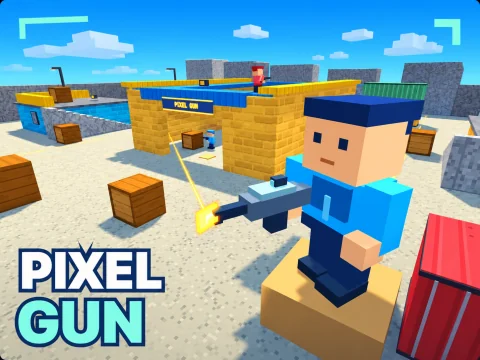
Pixel Gun is a first-person shooter set in a three-dimensional world of blocks. Battles take place in arenas with cover, stairs and elevated walkways. Play on your own against arena opponents or invite friends into a shared room. The game runs in your browser on both computers and phones.
There are three game modes. In Free for All, the player with the most eliminations wins; ties favor a higher score, then fewer deaths. Team Deathmatch pits blue against red, with each team's eliminations added together. Friendly fire is disabled. In Gun Game, every elimination automatically advances you to the next weapon: work through the arsenal and finish the sequence with the knife before your rivals. If the timer expires first, the round ends with the current standings.
Each of the three maps offers different fighting positions. Port 08 is a container terminal with a warehouse and accessible rooftops. Red Canyon is a sandstone arena with a stone arch, towers and a raised wooden bridge. Citadel is a fortress with courtyards, stairs and elevated walkways. Use high ground to survey the arena, and walls or containers to break line of sight and approach from another direction.
The arsenal contains eight weapons: a knife, pistol, submachine gun, shotgun, assault rifle, sniper rifle, machine gun and rocket launcher. In the standard modes, they are available from your first match unless the room owner restricts the selection. The shotgun works best at close range, the sniper rifle suits distant positions, and rockets deal blast damage. Weapons differ in fire rate, spread, magazine capacity and reload time. Aiming and crouching reduce spread, while headshots deal extra damage. Manual weapon switching is disabled in Gun Game.
Keep track of health, armor and ammunition. Armor absorbs some incoming damage, health kits restore health, and ammunition crates replenish reserve rounds and add armor. Magazines still need reloading, so check your remaining rounds before leaving cover. If you are eliminated, you return to the arena after three seconds with brief spawn protection.
Before a match, choose the arena, game mode, round length—1, 2, 3, 5 or 10 minutes—and the number of arena participants: 2, 4, 6 or 8. Standard modes also let you set which weapons are allowed. To play together, sign in and select “Invite a friend to play.” A room supports up to eight real players, including the owner; accepted friends can join. Local opponents fill the remaining places. Room chat lets you communicate during the game.
The statistics panel shows matches, wins, eliminations, deaths, K/D ratio, accuracy, best score and time played. Guest preferences, outfit color and recorded statistics stay on the device; signing in lets you store your personal game data in your account. Computer controls use the mouse and keyboard, with adjustable sensitivity and graphics quality. On phones, a joystick handles movement, swiping controls the view, and on-screen buttons handle firing, aiming, jumping, crouching and reloading. A separate screenshot button lets you download a picture of the game.
There are three game modes. In Free for All, the player with the most eliminations wins; ties favor a higher score, then fewer deaths. Team Deathmatch pits blue against red, with each team's eliminations added together. Friendly fire is disabled. In Gun Game, every elimination automatically advances you to the next weapon: work through the arsenal and finish the sequence with the knife before your rivals. If the timer expires first, the round ends with the current standings.
Each of the three maps offers different fighting positions. Port 08 is a container terminal with a warehouse and accessible rooftops. Red Canyon is a sandstone arena with a stone arch, towers and a raised wooden bridge. Citadel is a fortress with courtyards, stairs and elevated walkways. Use high ground to survey the arena, and walls or containers to break line of sight and approach from another direction.
The arsenal contains eight weapons: a knife, pistol, submachine gun, shotgun, assault rifle, sniper rifle, machine gun and rocket launcher. In the standard modes, they are available from your first match unless the room owner restricts the selection. The shotgun works best at close range, the sniper rifle suits distant positions, and rockets deal blast damage. Weapons differ in fire rate, spread, magazine capacity and reload time. Aiming and crouching reduce spread, while headshots deal extra damage. Manual weapon switching is disabled in Gun Game.
Keep track of health, armor and ammunition. Armor absorbs some incoming damage, health kits restore health, and ammunition crates replenish reserve rounds and add armor. Magazines still need reloading, so check your remaining rounds before leaving cover. If you are eliminated, you return to the arena after three seconds with brief spawn protection.
Before a match, choose the arena, game mode, round length—1, 2, 3, 5 or 10 minutes—and the number of arena participants: 2, 4, 6 or 8. Standard modes also let you set which weapons are allowed. To play together, sign in and select “Invite a friend to play.” A room supports up to eight real players, including the owner; accepted friends can join. Local opponents fill the remaining places. Room chat lets you communicate during the game.
The statistics panel shows matches, wins, eliminations, deaths, K/D ratio, accuracy, best score and time played. Guest preferences, outfit color and recorded statistics stay on the device; signing in lets you store your personal game data in your account. Computer controls use the mouse and keyboard, with adjustable sensitivity and graphics quality. On phones, a joystick handles movement, swiping controls the view, and on-screen buttons handle firing, aiming, jumping, crouching and reloading. A separate screenshot button lets you download a picture of the game.
How to play
Move with WASD and look with the mouse. Left click fires; right click aims. Space jumps, Shift sprints, C crouches and R reloads. Use number keys 1–8 or the mouse wheel to switch weapons. Esc opens the menu and releases the pointer; Enter opens room chat. On touchscreens, use the joystick, the right-hand look area and on-screen buttons. Aim carefully, use cover and reload before running out. In team mode, target the opposing team. Sign in and choose “Invite a friend to play” to share a room.