Age of War 2
- Age rating:
- 12+
- Ability to play in full screen:
- Yes
- Technology:
- Ruffle
- Platforms:
- Browser (desktop, mobile, tablet)
- Publication date:
- File size:
- 10.88 MB
Game information
Screenshot from the game
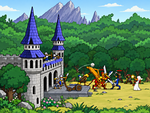
Age of War 2 is a strategy game about defending your base and destroying the enemy stronghold. Battles begin in prehistory with club fighters and dinosaurs, then development opens the way to knights, cannons, tanks and futuristic machines. Recruit an army, build defenses and decide when to invest in another era. Soldiers march and attack automatically, leaving you to manage resources and choose the reinforcements that the front line needs.
How to play Age of War 2
- Select Start Game and choose a difficulty. Your base is on the left and the enemy base is on the right, with one route between them.
- Recruit your first fighters. An order spends gold and reserves population as soon as it enters the training queue. Units are prepared one after another.
- Watch the enemy army and select units that can counter it. Filling the battlefield with the same troop is not always the best answer.
- Divide your gold between reinforcements, defenses and research. Collect experience for evolution or your current era's special attack.
- Push through to the enemy stronghold and reduce its health to zero before your own base falls.
Gold, experience and population
Gold pays for troops, turrets, tower extensions and research. You earn it by eliminating enemy units; simply waiting without fighting does not produce automatic income. Experience comes from enemy casualties and, in smaller amounts, losses in your own army. Evolution and special attacks draw on the same experience reserve, so using a powerful attack can delay your next technological step.
Each army has 10 population points. Most units use one point, but Assault Dino, Tank and God's Wrath require two. Ten points therefore do not always mean ten individual fighters. Orders already in the queue also occupy population, so having money available does not guarantee that you can recruit another unit immediately.
Four troop classes
Units belong to support, infantry, anti-armor and armored classes. Their strengths form a cycle: support counters anti-armor, anti-armor counters armored units, armored units counter infantry, and infantry counters support. A useful mix can matter more than the size of a formation.
There are 29 troop types: four in each era and an additional choice in the future. The roster includes Spartan spearmen, Egyptian warriors, archers, knights, cannons, modern soldiers and futuristic machines. Some units require an unlocking research purchase first. Training time matters too: an expensive reinforcement does not appear instantly and may arrive too late to rescue an exposed base.
Seven eras of development
Evolution moves through prehistory, the Spartan era, ancient Egypt, the Middle Ages, the Renaissance, modern warfare and the future. Each step costs experience, changes your base and opens new purchases. The opponent develops independently, so the two sides will not always field equivalent technology.
Existing troops and installed turrets remain when you advance. Your base gains maximum health and receives the corresponding health difference, but earlier damage is not completely erased. The development panel contains 18 research options, including unit unlocks and class upgrades. Invest in the troops you actually recruit while keeping enough gold to replace casualties.
Defensive towers and special attacks
You can progressively buy up to four turret positions on your defensive tower. Choose a weapon, then select a free position to install it. Across the eras there are 17 turret models, ranging from primitive weapons to rocket launchers and plasma cannons. They automatically fire at enemies within range. Selling a turret returns half its purchase price and frees its position.
Every era has a different special attack: meteorites, lightning, fire, arrows, cannonballs, a bomber or a futuristic beam. You need enough experience and a completed 60-second cooldown, including the initial wait at the start of a battle. These attacks damage enemy troops rather than the base itself. Use them to weaken a dangerous offensive and give your army room to advance.
Winning and losing
Destroy the enemy base to win; losing your own base ends the battle in defeat. You can win in any era. Reaching the future is optional, and advancing to the final era does not finish the battle by itself.
Tips
- Keep gold available for replacements. Spending everything on research can leave nobody to stop the next attack.
- Combine troop classes and inspect the enemy formation before committing all ten population points.
- Let turrets support your defense while you collect experience, but recruit troops to push forward.
- Save special attacks for serious enemy pressure and consider whether their experience cost will delay a needed evolution.
- Use normal speed when you need to think through purchases. Increasing the speed also accelerates the opponent.
Similar games
In Kingdom Defense 3D, you also divide resources between defenses and upgrades to stop an advancing enemy. Dawn Kingdoms 3D expands the strategic planning with a settlement, resource gathering and direct orders to your army.
How to play
Controls
- Left mouse button: select menu options, recruit troops, research upgrades, evolve and activate special attacks.
- Point at an icon: inspect its information and purchase cost.
- Build defenses: buy a tower position, choose a turret, then select a free position to place it.
- Sell a turret: select the selling option, then the installed turret.
- Scroll the battlefield: move the pointer to its left or right edge.
- Speed: use the speed button to switch between 1× and 2×.
- Pause: select Options; choose Return to Game to resume. This menu also has separate music and sound-effects volume controls.
Troops move and attack automatically.