Sugar Isles 3D
Free · Right in your browser
Sugar Isles 3D
- Ability to play in full screen:
- Yes
- Technology:
- HTML5 / WebGL
- Platforms:
- Browser (desktop, mobile, tablet)
- Publication date:
- File size:
- 2.10 MB
Game information
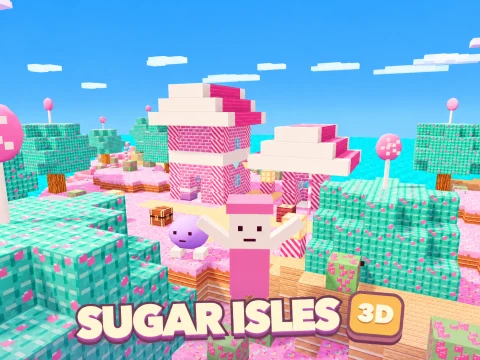
Sugar Isles 3D is a first-person sandbox about exploring a candy archipelago, gathering materials, making tools and building a shelter. Sponge-cake shores, caramel trees, wafer paths and candy crystals form a world you can reshape one block at a time. Survival mode adds health and hunger, while Creative mode lets you concentrate on construction.
How to play Sugar Isles 3D
- Choose an empty world slot, give it a name and select a mode. You can keep up to eight separate worlds and return to any of them later.
- Look around Sugar Valley. Its safe village contains a workbench and your first treasure chest.
- Gather caramel logs, turn them into wafer planks and make sticks. Stand near a workbench for more advanced recipes.
- Craft a pickaxe, collect stone and coal, then search for crystals. Better materials unlock stronger tools and decorative blocks.
- Find a building site outside the protected village. Construct a home, visit the other islands, complete objectives and prepare for nightfall.
A world made of sweets
The archipelago has a central valley and four outlying regions: Strawberry Island, Cocoa Cliffs, Mint Coast and Candy Peak. Narrow crossings connect them, so you can reach new areas on foot. Ground colors, plants and decoration vary between islands. Beneath the surface are stone, coal and crystal ore.
The cubic blocks belong to the world itself: break them to gather materials and place new blocks to reshape the landscape. Combine wafer planks, icing, candy bricks, glass and colored blocks rather than building every wall the same way. Add a roof and lanterns when the structure is ready. The central village is protected against destruction, so choose a site farther from its center for your own project.
Gathering, tools and recipes
Materials have different hardness values. Mining takes time, and a suitable tool speeds it up. Pickaxes work on stone and ore, axes help with wood, and swords are useful against nighttime enemies. Wafer, stone and candy tools differ in speed and durability. Crystal ore requires an appropriate pickaxe, so you must advance beyond the starting tool before collecting it properly.
The crafting menu includes tools, building materials, a workbench, a chest, a bed, lanterns and food. Check the ingredient list before making an item: the required resources must be in your own inventory. Simple recipes can be made immediately, while advanced ones need a nearby workbench. Survival tools wear out, giving you a reason to keep spare planks, sticks and stone after finishing your first house.
Eight hotbar slots let you prepare the items you expect to use. Other supplies remain in the inventory, and you can change a slot when the task changes. Treasure chests around the islands provide ready-made resources and food. Each chest can be looted once in that world; repeatedly opening it does not create more supplies.
Survival, night and objectives
Health and hunger are separate meters in Survival mode. Sprinting consumes food faster than walking. Berries, marshmallows and other foods restore hunger; keeping well fed allows health to recover gradually. Take care when descending from high places, as a bad fall can damage your character.
Day turns into night. Outside the safe village, angular crumb monsters appear. Use suitable equipment if you choose to confront them at close range. The peaceful jelly inhabitants are not combat targets. A bed lets you wait out the night. If you run out of health, you return to the starting point while your constructed world remains.
Six introductory objectives guide you through gathering wood, making planks, crafting a bench and pickaxe, collecting stone and starting a shelter. Ten further goals cover exploration, tool progression, food, treasure and surviving the night. They suggest useful next steps without replacing free building with a fixed sequence of levels.
Saves and friends
Guests keep their worlds on the current device. After signing in, personal worlds and inventory are stored in the account. A room supports up to eight players in total, including its owner. Friends can see each other, change the same terrain, open shared treasure chests and encounter the same creatures. A visitor's personal worlds remain separate from the host's map.
Tips
- Prepare a workbench and pickaxe before setting off to find rare ore.
- Keep food and building blocks on the hotbar before a long journey.
- Walk carefully across narrow paths and look ahead before jumping.
- Begin with a compact shelter and lighting; add decoration after preparing for night.
- If a recipe is unavailable, check both its ingredients and your distance from a workbench.
Similar games
Worlds offers personal block worlds with a different setting. Skyblock focuses on gathering resources and expanding a small island. For obstacle courses in a cubic world, try Level Up: Parkour.
How to play
Controls
- WASD or arrow keys — move; mouse — look around.
- Space — jump; Shift — sprint.
- Hold the left mouse button — mine a block, or attack while holding a sword.
- Right mouse button — place the selected block or use the object in front of you.
- E — interact with a workbench, chest, bed or suitable object; F — eat the selected food.
- I or Tab — inventory; C — recipes.
- 1–8 or mouse wheel — select a hotbar slot.
- Esc or M — menu.
On a touchscreen, use the left joystick to move and drag on the right side to look around. On-screen buttons handle jumping, mining and using objects. Inventory, recipes and food also have on-screen controls.